Solve "ECU Locked by EEPROM" on Foxflash PCR2.1
Problem: Anyone had issues with this weird bug, where after PCR2.1 eeprom unlock, Foxflash stays "ECU LOCKED BY EEPROM"?

Solution:
Just read/write eeprom and unlock it.
Read Ori Eeprom.. Save it. Now write
The same File you just read. Now Eeprom unlocked.
When you unlock it, close program and start again, it will show unlocked.
How to Set Up Padflashr Software and Driver
Here we will walk you through how to install padflashr software and driver step-by-step. This is the baby-level setup guide for padflash programmer.
1: Visit https//padflashr.uk
Go to site download the software and tools drivers.
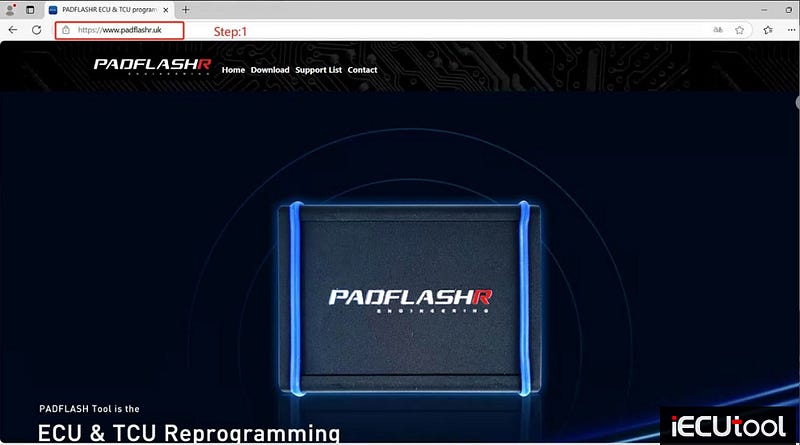
Download all 3 packages.

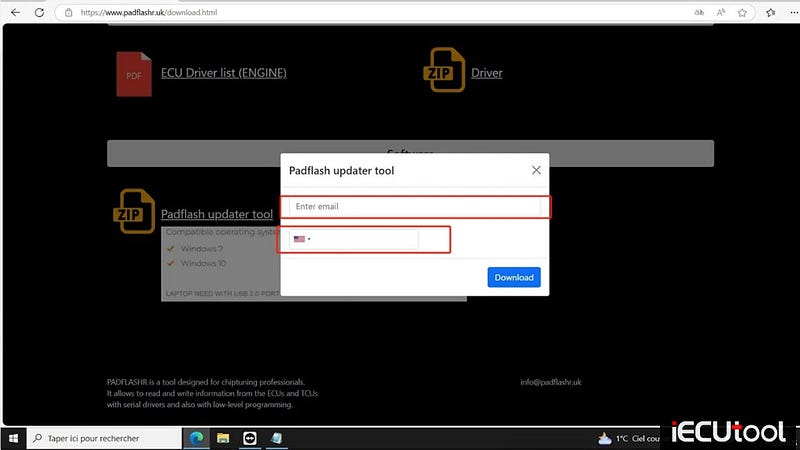
2: Go to donwload page , write your email and tools SN.

3:tools software
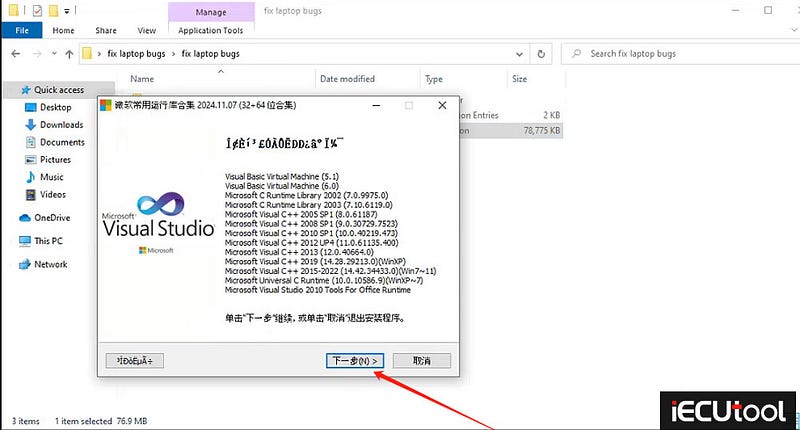
PATCH INSTALL
After download, please install the super driver with admin mode, and install the fix laptop patch.

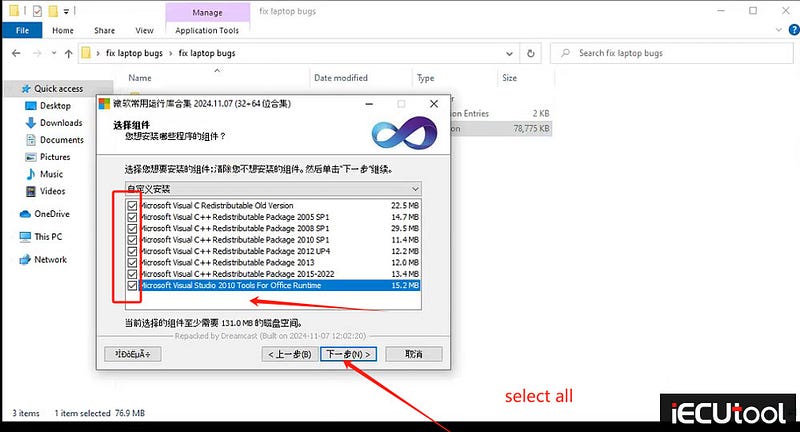
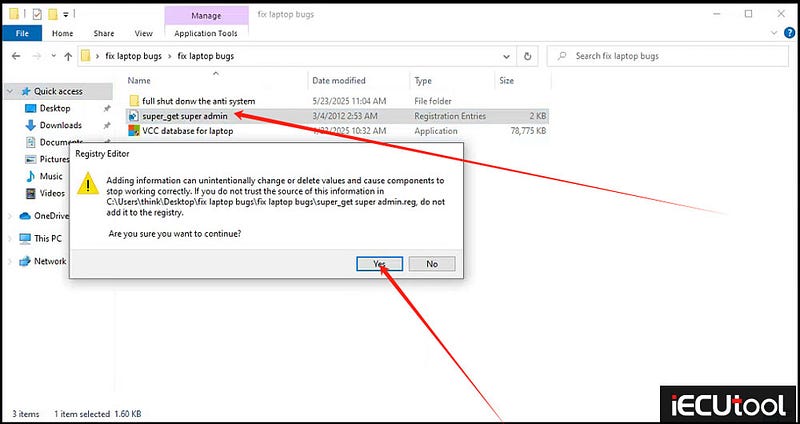
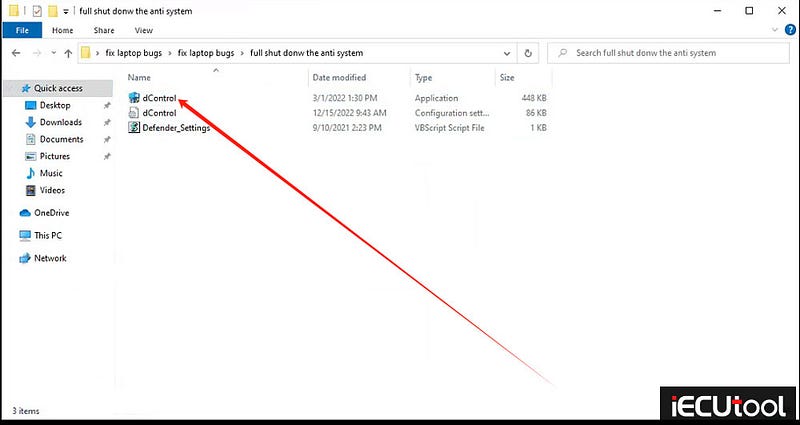

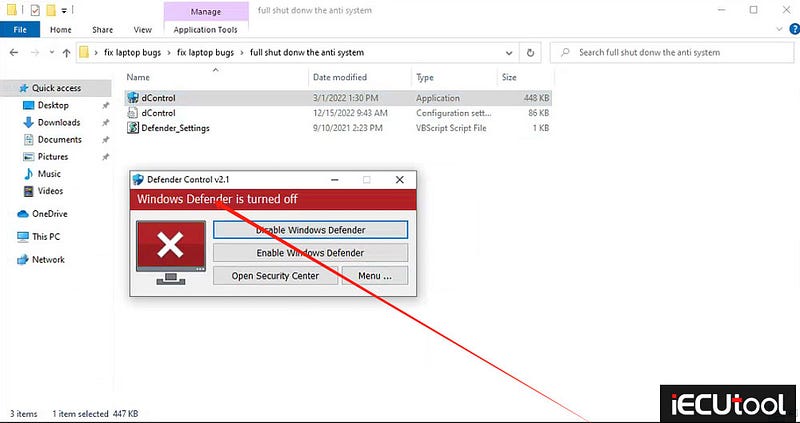
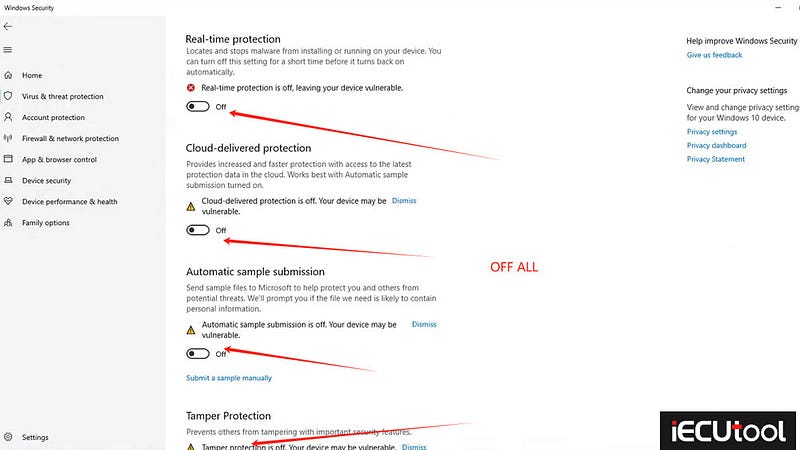
SHUT DONW THE DEFENDER IN SYSTEM INSIDE(BELOW IS THE WINDOWS 10 64 SYSTEM, WIN11 AND WIN7 ALSO NEED DO THESE WORK )
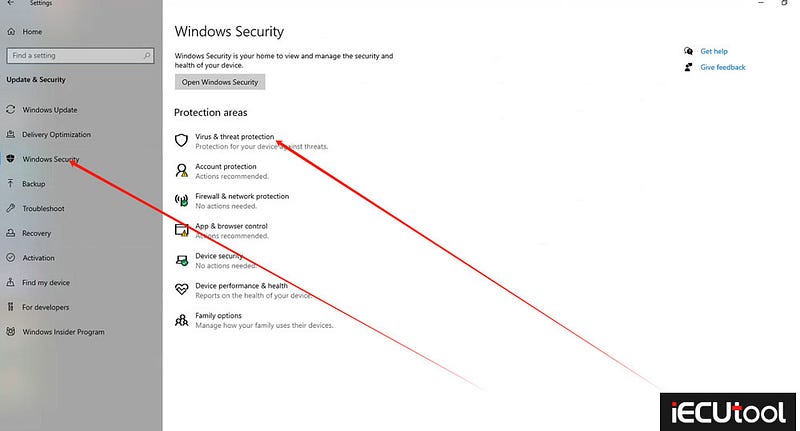
Go to Update & Security.

Turn off All options.

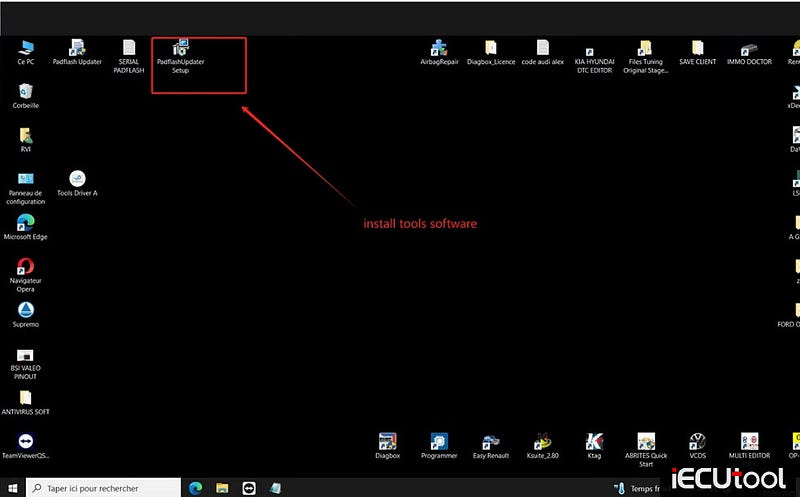
4:install padflashr software
Install tools software.
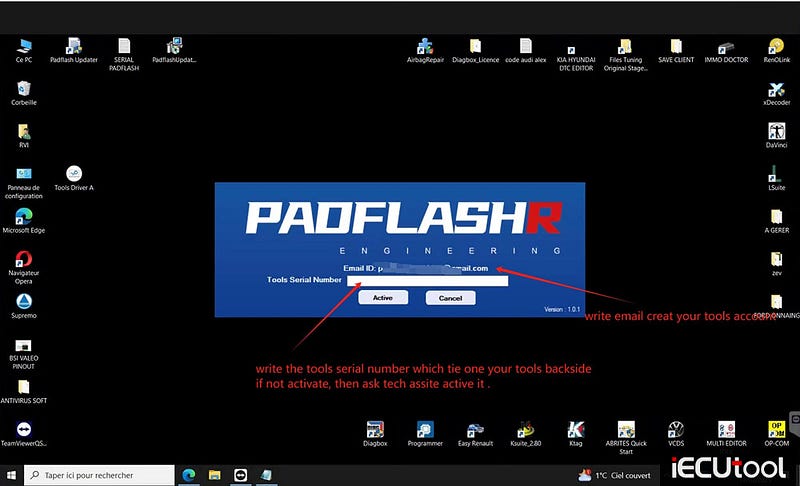
5:write your email and tools serial number for register.
Write email creat your tools account.
Write the tools serial number which tie one your tools backside. If not activate, then ask tech assite activate it.
6: Restart your padflashr updater after register then download the update files.
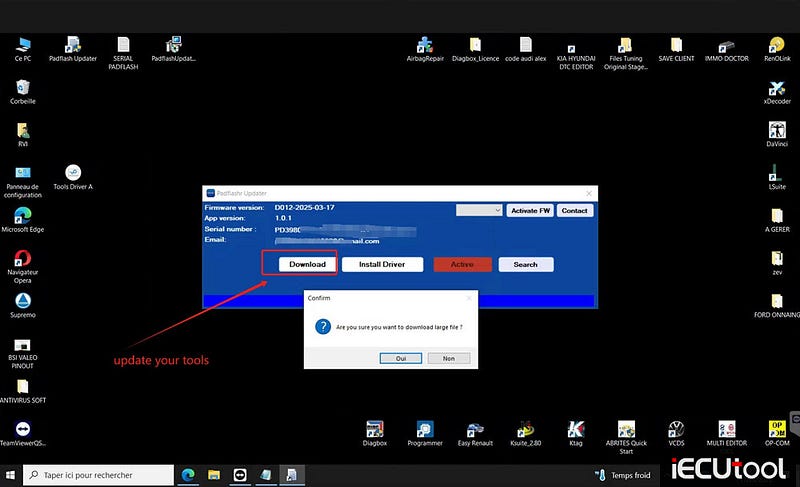
7:wait download finish
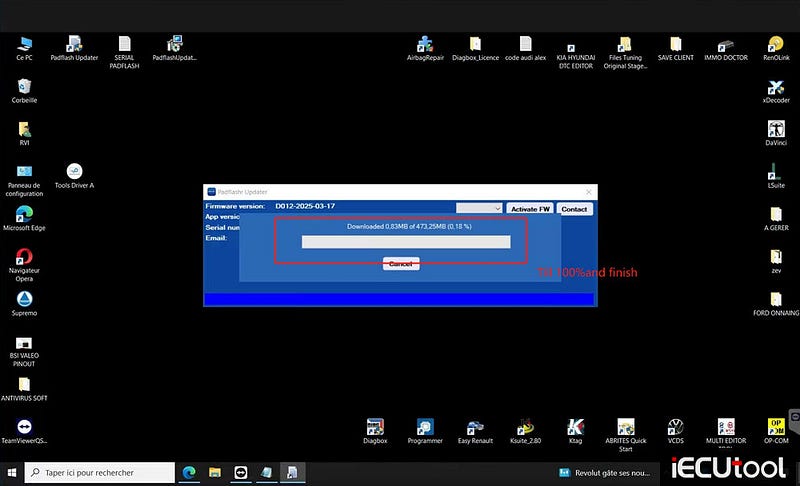
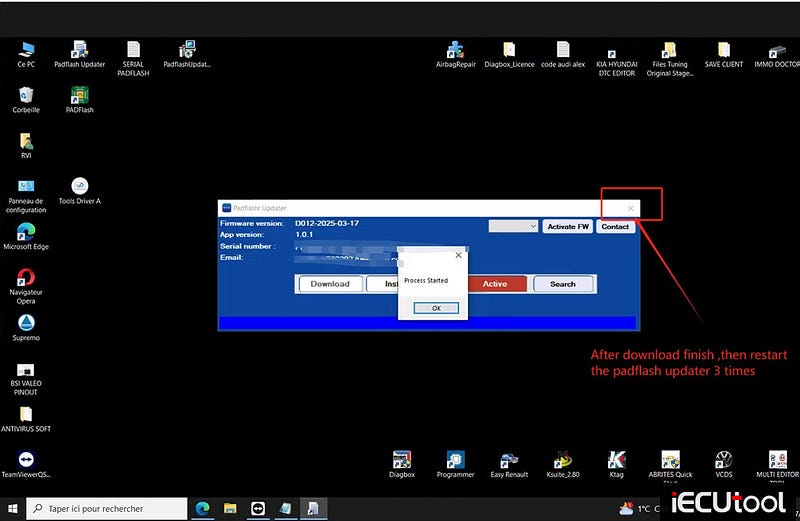
8 after donwnload finish , restart the padflashr updater 3 times.
9: connect the PADFlash programmer and dongle install the dongle driver.
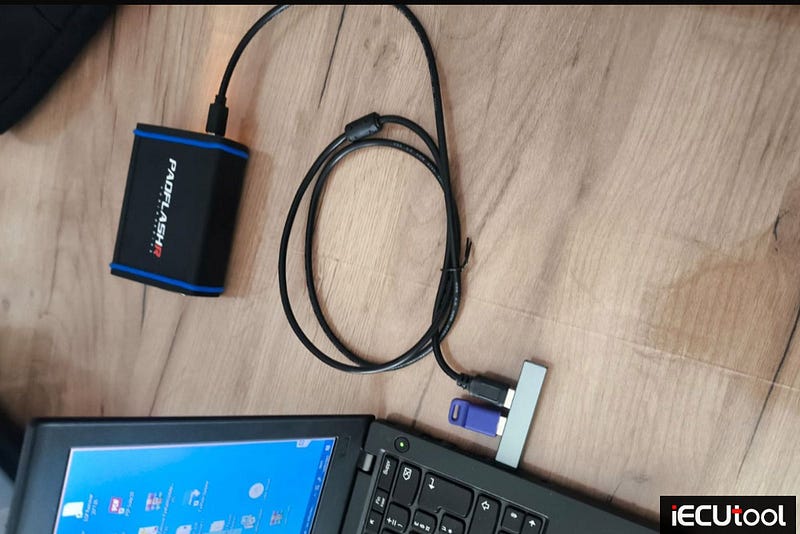
Install the dongle driver here.
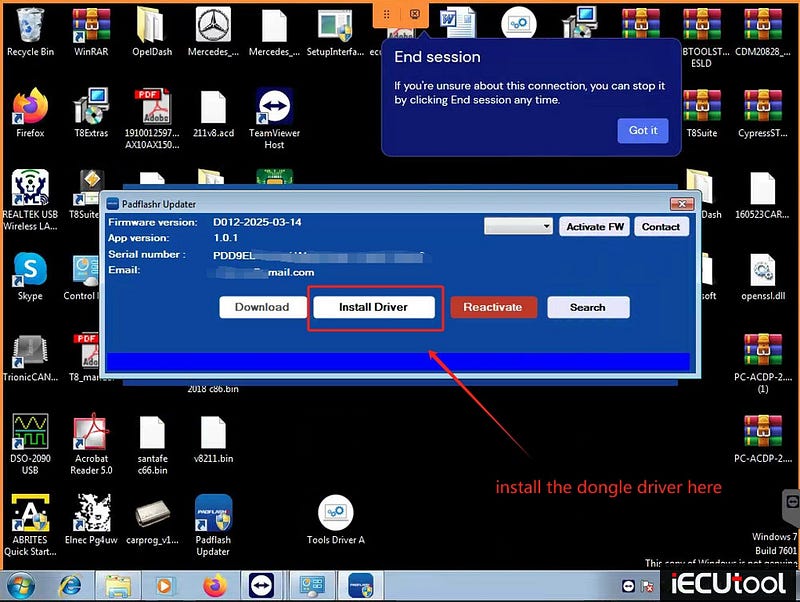
10:connect the tools and drivers. Install the tools drivers.
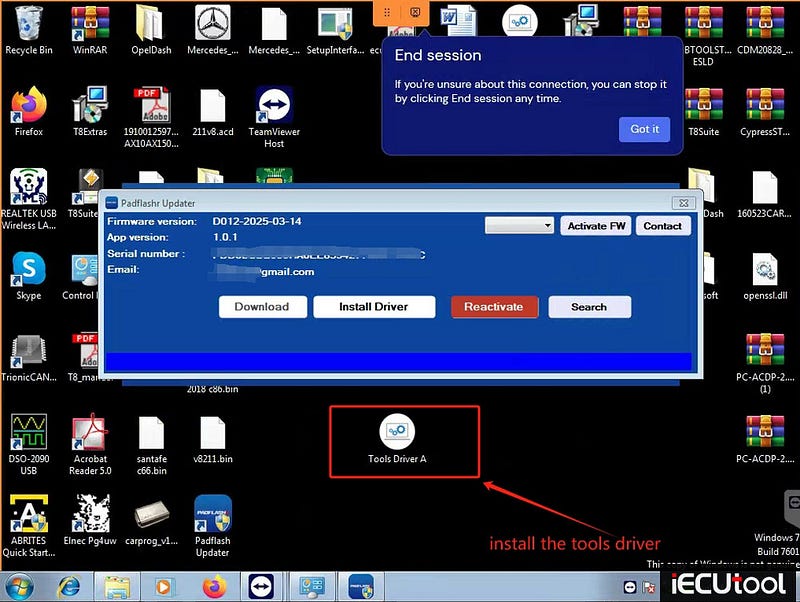
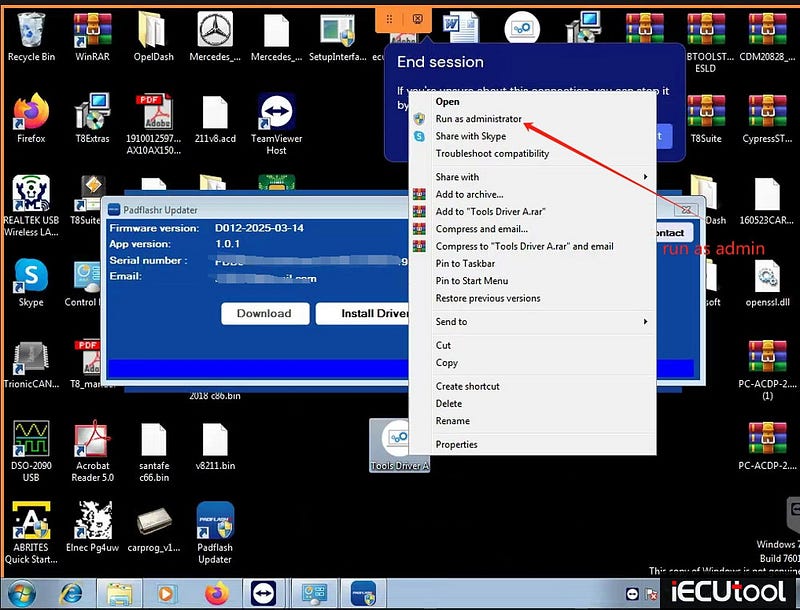
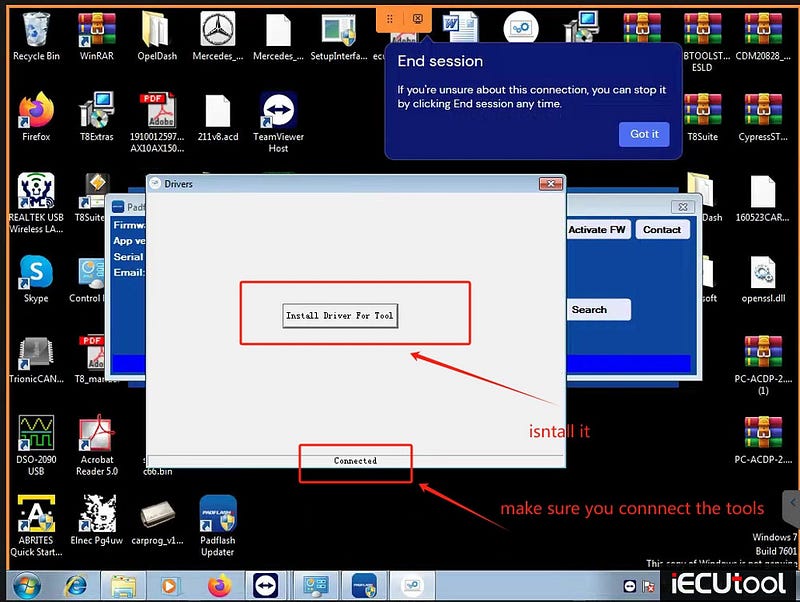
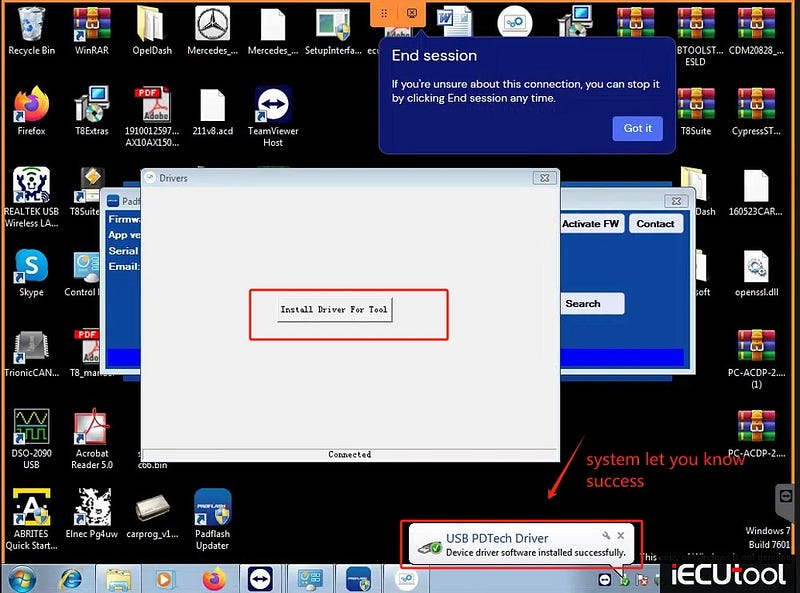
!!!!!!Very importantings here ,don’t miss it !!!!!!
Keep your padflashr updater .exe is runing , then go to this
folder(C:disk/windows/systembin/pdata)
,set up the padflashr.exe as admin running mode(after set it as admin , then run it as admin mode , it will display a windows ask you input the sn ,so you write your tools big letters sn in it.then login) ,check the picture ,and follow me .

C:disk/windows/systembin/pdata
Find this padflash.exe

Set it as admin run mode.

11: run the padflashr updater.exe software ,click the active (don’t direct go to desktop run the padflash.exe), ,wait a little time , a windows will pop on,then write your tools serial number with big letters
After software open , click the actvate the FW, it have the licens for your tools fireware
Every time you need click it activate FW when you close your software, it will upgrade the whole tools fireware every time when you close the software.
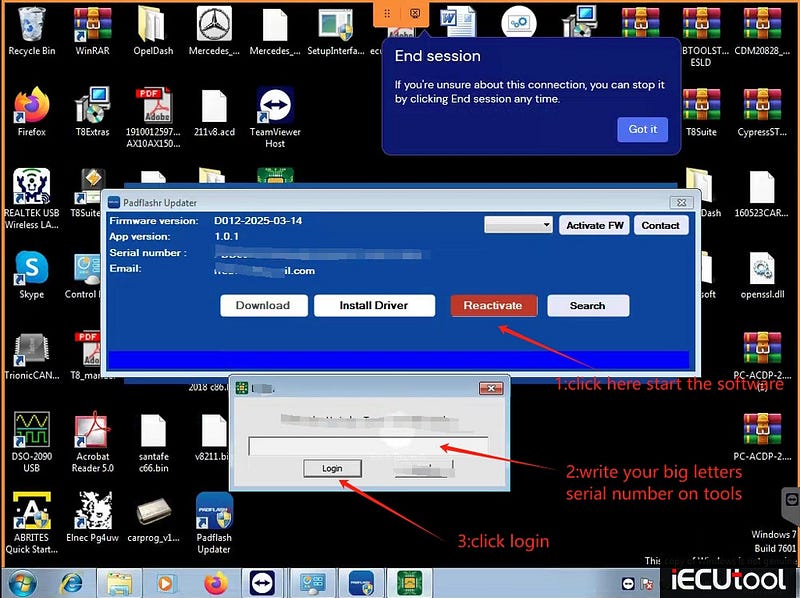
Notice :windows 10 and windows 11 must shutdown the defender fully , and turn off the real time scan , and all need do , if all of these you do , you cant let the tools work well and software running well , contact the remote support help you refresh your windows system , it must be the windows lack some patch .
How to Read Smart ME7.7.0 ECU with Foxflash
Problem: I have a problem reading bosch me7.7.0 smart 1.0i ECU with Foxflash on bench. Any solution?
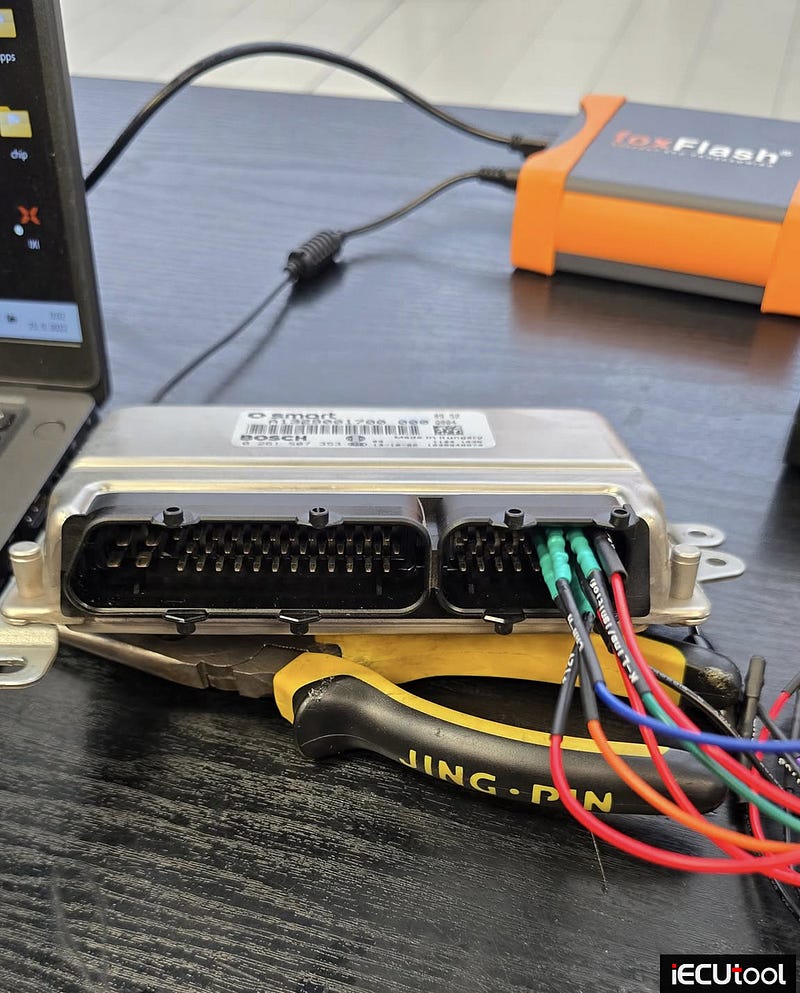
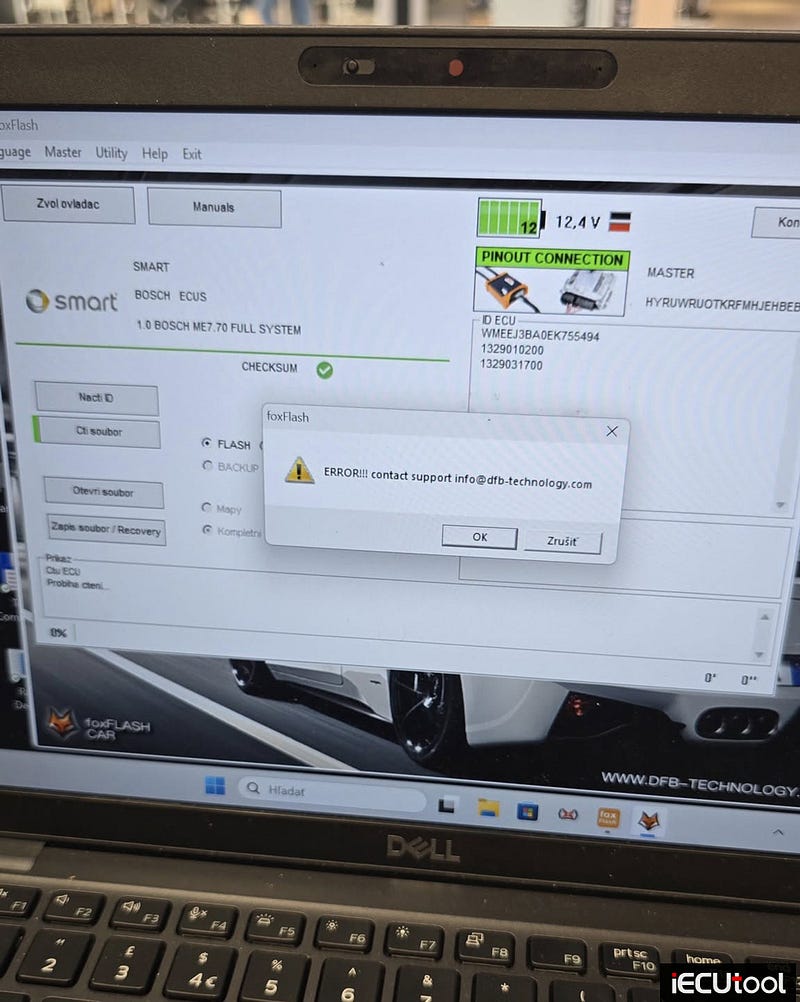
Solution:
Easy Boot for this ecu.
Boot mode works. With More voltage.
Ktag/KESS3
also does this ECU.
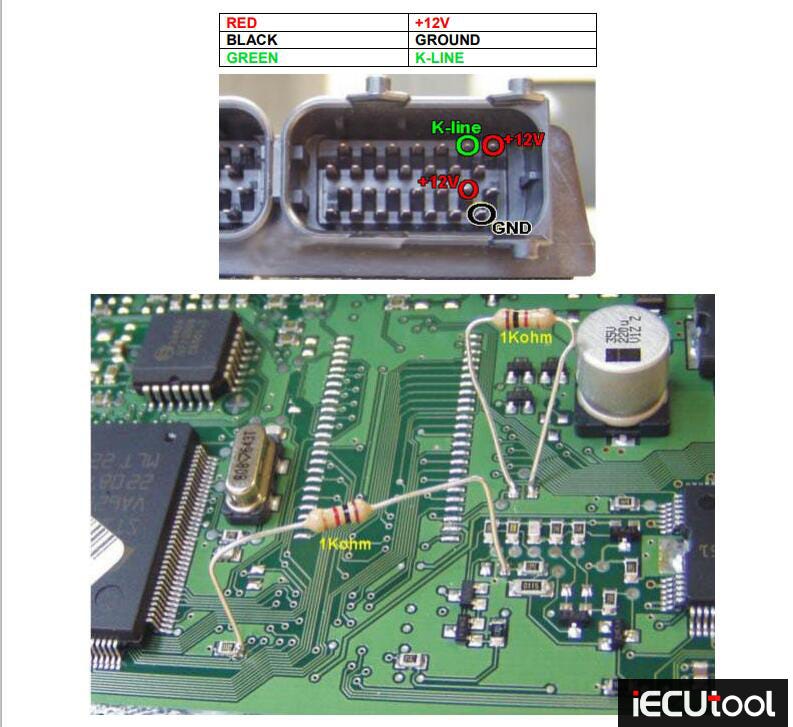
To read and write use the following driver:
→ TOOLS BOOT MODE
→ ST10Fxx
→ ST10F273 / ST10F275 / ST10F276 *K
May 2025 Review: OBDSTAR DC706 vs CG FC200
CG FC200 vs. OBDSTAR DC706: Which One is Better?
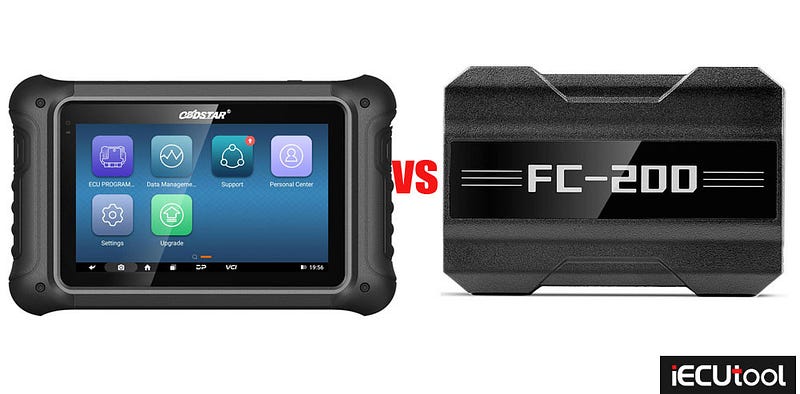
The OBDSTAR DC706 is a versatile device designed for reading and writing engine control units (ECUs), body control modules (BCMs), and transmission control modules (TCMs). Here’s what makes it stand out:
Key Features:
- Wide Vehicle Coverage: Supports a broad range of brands, including Chrysler, Dodge, Fiat, Ford, Chevrolet, GM, Jaguar, Jeep, and more.
- BCM Cloning: Excels at cloning BCMs for Ford, Chevrolet, and GM, including older models up to around 2017–2018.
- Transmission Support: Reads and writes TCMs for brands like BMW (6HP, 8HP series) and Chevrolet (6L50, 6T30, etc.).
- User-Friendly Interface: Clear symbols indicate whether operations are performed via OBD, bench, or boot mode.
Performance Highlights:
- Chevrolet Compatibility: Covers most Chevrolet ECUs (e.g., E37, E38, E39, E67, E78, etc.), except for the newest models (post-2020).
- Additional Functions: Unlocks older Ford radios and handles airbag modules for Volvo and other brands.
- Reliability: Users report high success rates in cloning BCMs and ECUs, making it a cost-effective tool for workshops.
Ideal For:
- Technicians specializing in Chevrolet, Ford, and GM vehicles.
- Professionals needing BCM cloning and transmission module programming.
The CG FC200 is another notable device. Here’s a brief preview (a detailed review will follow in a separate article):
Key Features:
- Likely offers similar ECU and BCM programming capabilities but may differ in brand coverage or ease of use.
- May cater to different vehicle models or systems compared to the DC706.
Verdict: Which One Should You Choose?
Go for the OBDSTAR DC706 if:
- You work extensively with Chevrolet, Ford, or GM vehicles.
- BCM cloning and TCM programming are critical for your workflow.
- You need a reliable tool with broad compatibility for older to mid-range models.
Consider the FC200 (pending further details) if:
- It covers additional brands or newer models not supported by the DC706.
- It offers unique features that align with your specific needs.
New Alientech KESS3 OBD Protocol for 3.0 TDI VAG Vehicles
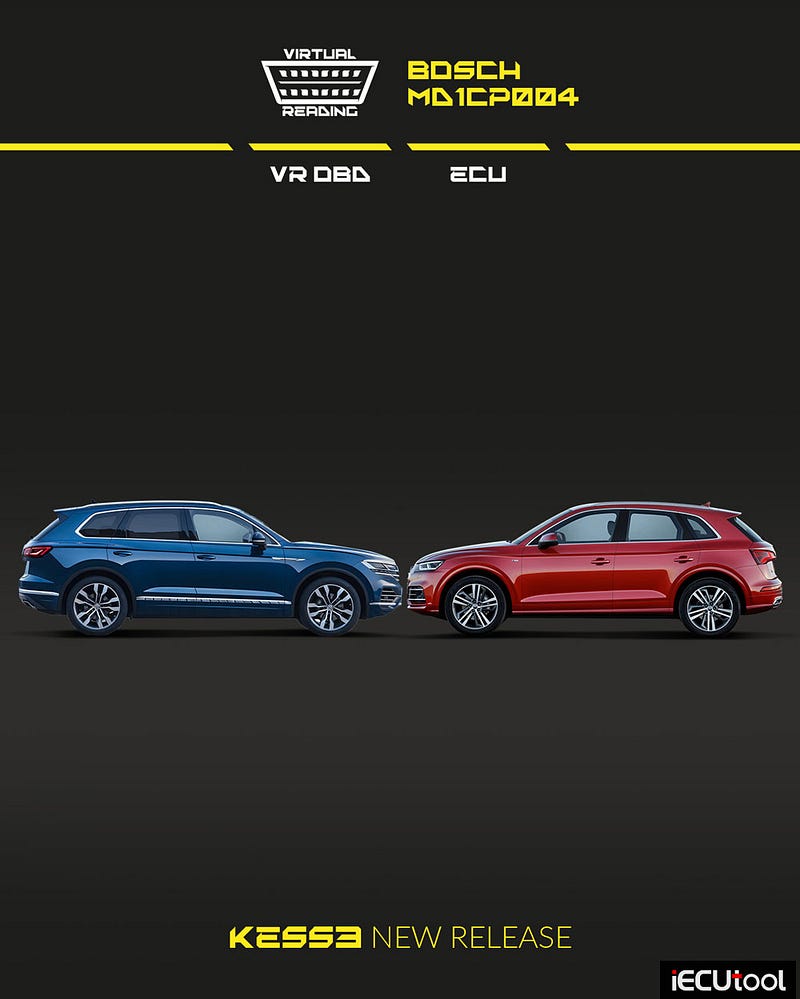
Alientech KESS3 release new OBD protocol Bosch MD1CP004–3.0 TDI VAG.
Work on Audi and Volkswagen Euro 6 vehicles (2015–2019) directly from the diagnostics socket!
- VR reading and writing via OBD.
- Fast, effective support for repair and maintenance.
Good news for workshops working on 3.0 TDI engines from the VAG group: you can now operate via OBD on Bosch MD1CP004 ECUs installed on Audi and Volkswagen vehicles produced between 2015 and 2019.
This update completes the existing BENCH coverage available on KESS3, offering an even more immediate solution by allowing direct access through the diagnostic port — no ECU disassembly required. A practical solution to improve daily operational efficiency.
It’s not just about performance: the speed and effectiveness of the OBD VR mode also prove extremely useful for repair and maintenance on sensitive components prone to wear or malfunctions — often responsible for warning lights and reduced performance. Fast and targeted interventions truly make a difference in the workshop.
Check compatibility and take advantage of the new coverage:
- Audi — 3.0 TDI Euro 6
- Volkswagen — 3.0 TDI Euro 6
Thanks to this update, you can work on a wide range of VAG vehicles with 2967 cc V6 diesel engines, produced up to 2019 — models that are still widely used today. A great opportunity to expand your services and offer your customers more versatile, up-to-date, and reliable solutions.